
Deploying a Supervisor in VMware Cloud Foundation 9 is often presented as a simple workflow inside the vSphere Client. In reality, the deployment wizard is the easy part. What actually determines success is the design work that happens before the wizard is ever opened.
A Supervisor can deploy successfully and still fail to deliver a usable platform if the surrounding networking, routing, load balancing, storage, and automation decisions were not made intentionally. That becomes even more important when the goal is not just enabling Kubernetes for demonstration purposes, but building a real platform that can support namespaces, services, VMware vSphere Kubernetes Service, and modern consumption models in VCF Automation.
This article walks through what actually matters when deploying a Supervisor in VCF 9. Rather than focusing only on the wizard itself, the goal here is to explain the design decisions behind it, especially around networking, VPC versus NSX Classic, Tier-0 architecture, routing, and how those decisions affect where the platform can go afterward.
All screenshots used in this article have been sanitized to remove environment specific identifiers while preserving functionality and workflow.
Starting Point: What the Supervisor Actually Is #
At a high level, the Supervisor is what brings Kubernetes directly into vSphere. It introduces a Kubernetes control plane into the environment and allows administrators to create vSphere Namespaces that can provide compute, storage, and networking resources for Kubernetes workloads.
That makes the Supervisor the foundation for several important capabilities, including:
- vSphere Namespaces
- vSphere Pods
- VMware vSphere Kubernetes Service, or VKS
- Supervisor Services
- developer and tenant consumption through VCF Automation
Before deployment begins, the vSphere Client already gives a strong indication that this is not just a feature toggle.
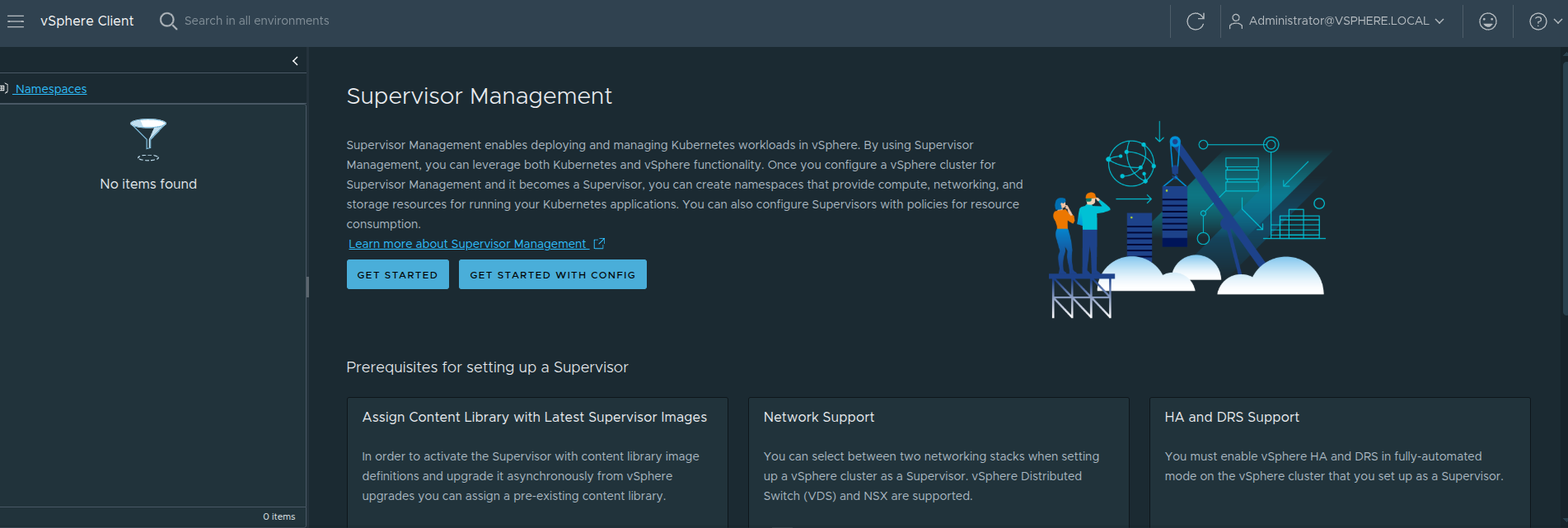
The Supervisor Management landing page highlights several prerequisite areas that must already be in place before deployment.
Content Library #
The Supervisor requires a content library containing the image artifacts used for Supervisor lifecycle operations. This is how the control plane components and related resources are staged and managed over time.
Network Support #
The platform explicitly calls out supported networking models. That reinforces a very important point: the networking model is not something to decide casually while clicking through the wizard. It must be selected as part of the platform design.
HA and DRS #
The target cluster must have vSphere HA enabled and DRS configured appropriately. The Supervisor is not simply deploying a single appliance. It is standing up a control plane that depends on proper cluster behavior for resiliency and placement.
Storage Policy #
Storage policies determine where the Supervisor control plane VMs, image cache, and related data land. Even though this often gets less attention than networking, it still affects placement and lifecycle behavior.
vSphere Zones #
The Supervisor can run in either a single-cluster model or in a zonal design. This influences availability design and how workloads will be spread later.
Load Balancer #
A load balancer is a foundational part of the platform because ingress into Kubernetes workloads has to terminate somewhere. This is not optional if the goal is to expose services in a practical way.
Why This Page Matters #
This page is easy to skim past, but it actually says a lot about what the Supervisor really is.
The Supervisor is not just enabling Kubernetes.
It is validating that your environment is ready to behave like a platform.
That is an important distinction, because many deployments succeed technically but still fall short operationally. The reason is usually that the prerequisites were treated like items in a checklist rather than part of an intentional design.
What Actually Makes Up a Supervisor #
It is also important to understand that the Supervisor is not just a UI workflow. It is made up of real infrastructure components working together:
- Supervisor control plane virtual machines
- NSX Manager when using NSX-backed networking
- a load balancer, typically Avi or another supported option depending on the model
Those components work together to:
- provide Kubernetes API access
- enable namespace-based consumption
- expose services and ingress paths
- integrate the platform with vSphere networking, storage, and authentication
That is why deploying a Supervisor should be treated as infrastructure enablement, not just a configuration exercise.
The Most Important Decision: Choosing the Networking Model #
Out of all the design choices involved in deploying the Supervisor, the networking model is the one that shapes the future of the platform the most.
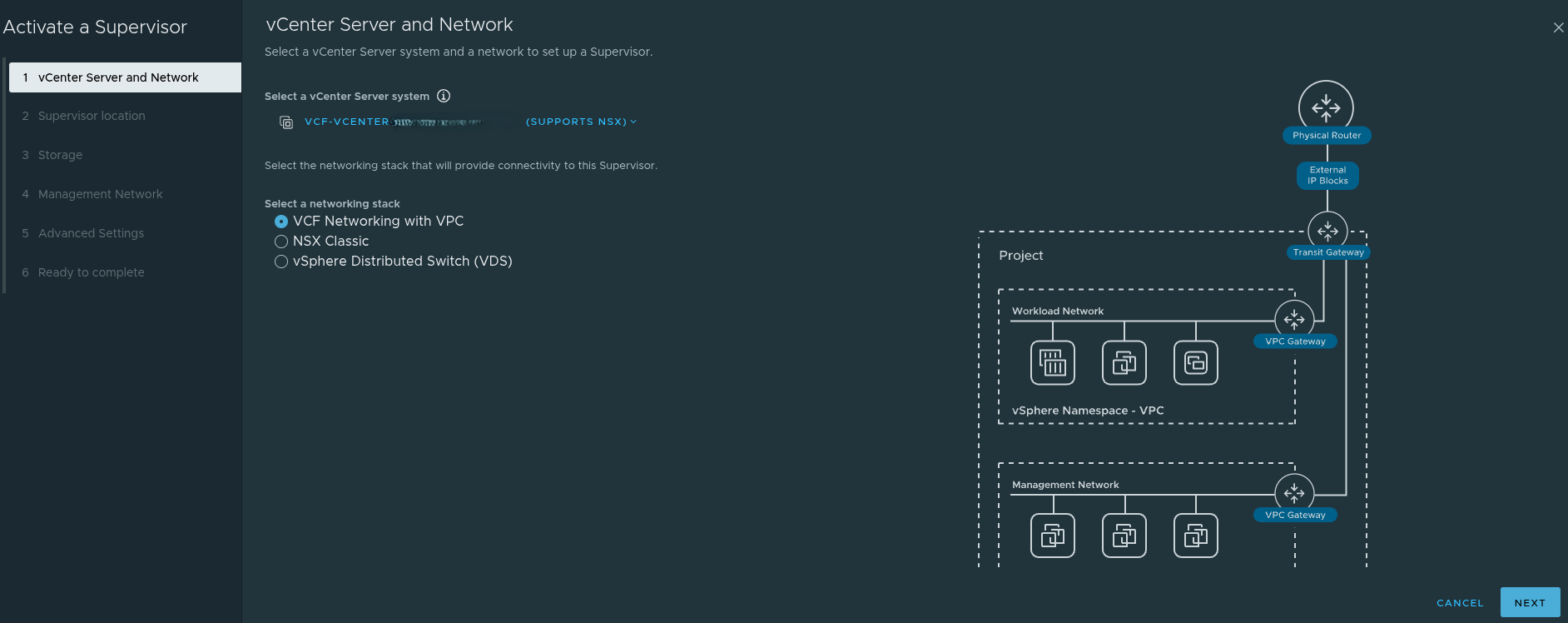
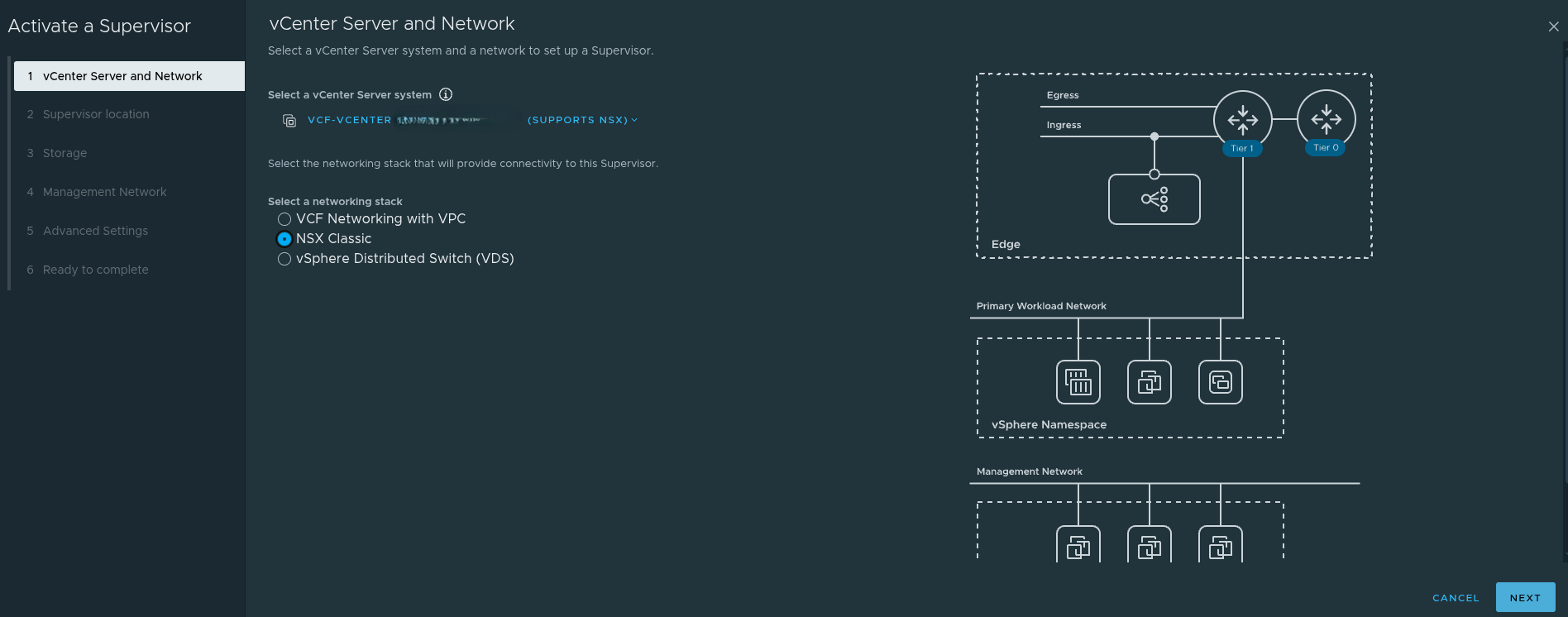
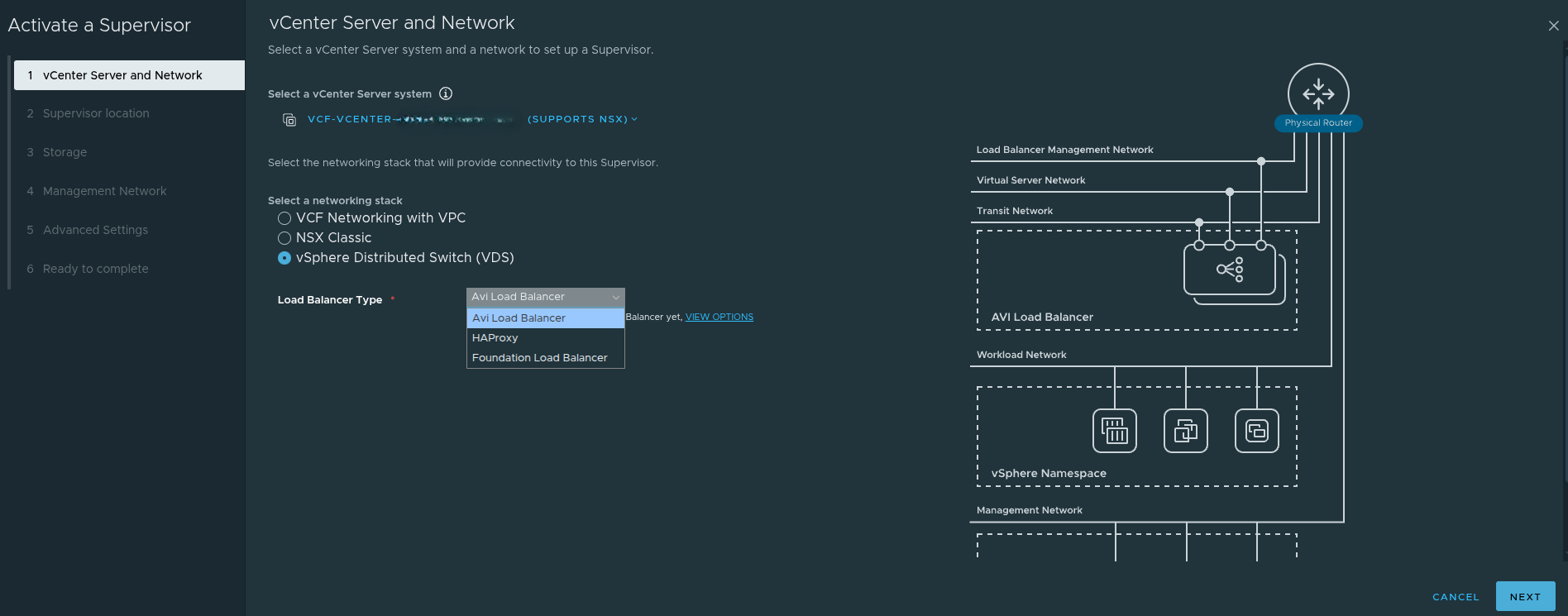
When activating the Supervisor, the main choices are:
- VCF Networking with VPC
- NSX Classic
- vSphere Distributed Switch, or VDS
At first glance, this looks like a simple deployment setting. In reality, it is a platform strategy decision.
The model you choose affects:
- how workloads are connected
- how namespaces consume networking
- whether modern application consumption patterns are supported
- how far the environment can go with VCF Automation
- what kinds of services can be delivered to developers later
VCF Networking with VPC #
The VPC-based model is the one most closely aligned to where VCF 9 is headed. It is designed around a more modern networking and platform consumption model.
Using VPC introduces constructs such as:
- projects
- transit gateways
- VPC gateways
- external IP blocks
- private VPC subnets
- private transit gateway subnets
- connectivity profiles
This is the networking model that best aligns with All Apps in VCF Automation.
That matters because All Apps is designed around delivering more than just traditional virtual machines. It is intended to support a broader platform model that includes modern application patterns, Kubernetes-backed consumption, and service-driven workflows.
In other words, if the long term goal is to build a platform for modern application delivery, VPC is not just another wizard option. It is the model that keeps that door open.
NSX Classic #
NSX Classic is still valid and still useful in many environments.
It aligns well with:
- traditional routed networking
- direct IP reachability
- operational familiarity
- simpler mental models for some infrastructure teams
There are environments where NSX Classic may still be the better fit, especially where operational constraints or policy requirements make a more traditional design desirable.
However, there is an important tradeoff that needs to be clearly understood.
If you choose NSX Classic, you are removing yourself from the All Apps path and aligning more naturally to VM Apps.
That does not mean NSX Classic is wrong. It means the choice should be intentional.
If the goal is to stay closer to a mature VM-centric automation model, NSX Classic may still be perfectly appropriate.
If the goal is to move toward the broader All Apps direction in VCF Automation, then NSX Classic becomes a limiting choice.
vSphere Distributed Switch, or VDS #
The VDS model is the exception to most of the NSX discussion in this article.
If you choose the vSphere Distributed Switch model:
- NSX is not required for the Supervisor networking stack
- networking is handled through traditional vSphere constructs
- external routing and load balancing must be handled outside of NSX
This can reduce complexity in some cases, but it comes with tradeoffs. It is not the path that aligns best with the richer NSX-backed platform and automation capabilities discussed throughout this article.
So while the statement that NSX must be designed first is true for NSX Classic and VPC, it is not universally true if the Supervisor is being deployed with VDS.
That is an important nuance.
Why This Choice Matters for VCF Automation #
The networking model directly affects what kind of consumption model the platform can realistically support later.
A helpful companion read on this topic is Allan Kjær’s article on the difference between All Apps and VM Apps:
VCF Automation: Understanding the Difference Between All-Apps and VM-Apps
At a practical level, the distinction looks like this:
VM Apps #
VM Apps is centered on traditional VM-based delivery. It is mature, stable, and well suited for environments focused on virtual machines and classic enterprise workloads.
All Apps #
All Apps is more application-centric and more forward-looking. It supports a broader set of workload types, including Kubernetes-backed platforms and modern application consumption patterns.
This is why the networking choice is so important.
If you do not choose VPC, you are removing the environment from the path that best supports All Apps.
That is not just a networking issue.
It is a platform capability issue.
VCF Context: Management Domain vs Workload Domain #
Before diving further into NSX and Supervisor deployment, it is important to clarify where this work is actually happening within a VCF environment.
This article assumes that a Workload Domain has already been created.
In VMware Cloud Foundation:
-
The Management Domain hosts core infrastructure components such as:
- vCenter Server
- NSX Manager
- SDDC Manager
-
Workload Domains are where:
- NSX networking is consumed
- Tier-0 gateways are deployed for north-south traffic
- Supervisor clusters are enabled
- VKS workloads are run
Because of this separation:
You are not typically deploying your Tier-0 gateway or Supervisor cluster in the Management Domain.
Instead, those components are deployed within a Workload Domain that is designed to host application and platform workloads.
This distinction is important, because it reinforces that the Supervisor is part of the consumption layer, not the core management infrastructure.
NSX Must Be Designed First for NSX-Based Supervisor Deployments #
Before enabling the Supervisor, NSX must already be operational if the environment is using NSX-based networking, meaning either NSX Classic or VPC.
That foundation includes:
- Edge Nodes deployed
- Tier-0 Gateway configured
- north-south routing validated
- load balancing configured
- upstream connectivity confirmed
The Supervisor depends heavily on this foundation.
If those pieces are not correct, the deployment may still complete, but the platform will not behave the way the team expects afterward.
Why This Matters in Practice #
This aligns directly with real-world architecture patterns.
When the Supervisor depends on NSX-backed networking, it also depends on:
- NSX Manager for control plane networking and policy
- Edge nodes for north-south traffic handling
- a functional load balancing path for workload exposure
Without these components in place, the Supervisor may deploy successfully, but:
- ingress will fail
- services will not be reachable
- namespaces will not behave the way consumers expect
- troubleshooting becomes reactive instead of intentional
Reference Architecture: Centralized Connectivity with BGP #
A strong supporting reference for the networking foundation is my colleague Sargon Khizeran’s article:
Configuring Centralized Connectivity Networking with BGP in VCF 9.0
That write-up is useful because it shows the plumbing that needs to exist before the Supervisor ever becomes part of the conversation, especially in environments where NSX-based connectivity and dynamic routing are being used.
It is a strong example of:
- Edge deployment
- Centralized Tier-0 design
- North-south connectivity preparation
- BGP as the routing model between NSX and the physical network
That article is especially helpful for understanding the networking prerequisites that underpin a successful Supervisor deployment.
Tier-0 Gateway Design Matters More Than People Think #
A major part of getting this right is the Tier-0 gateway design.
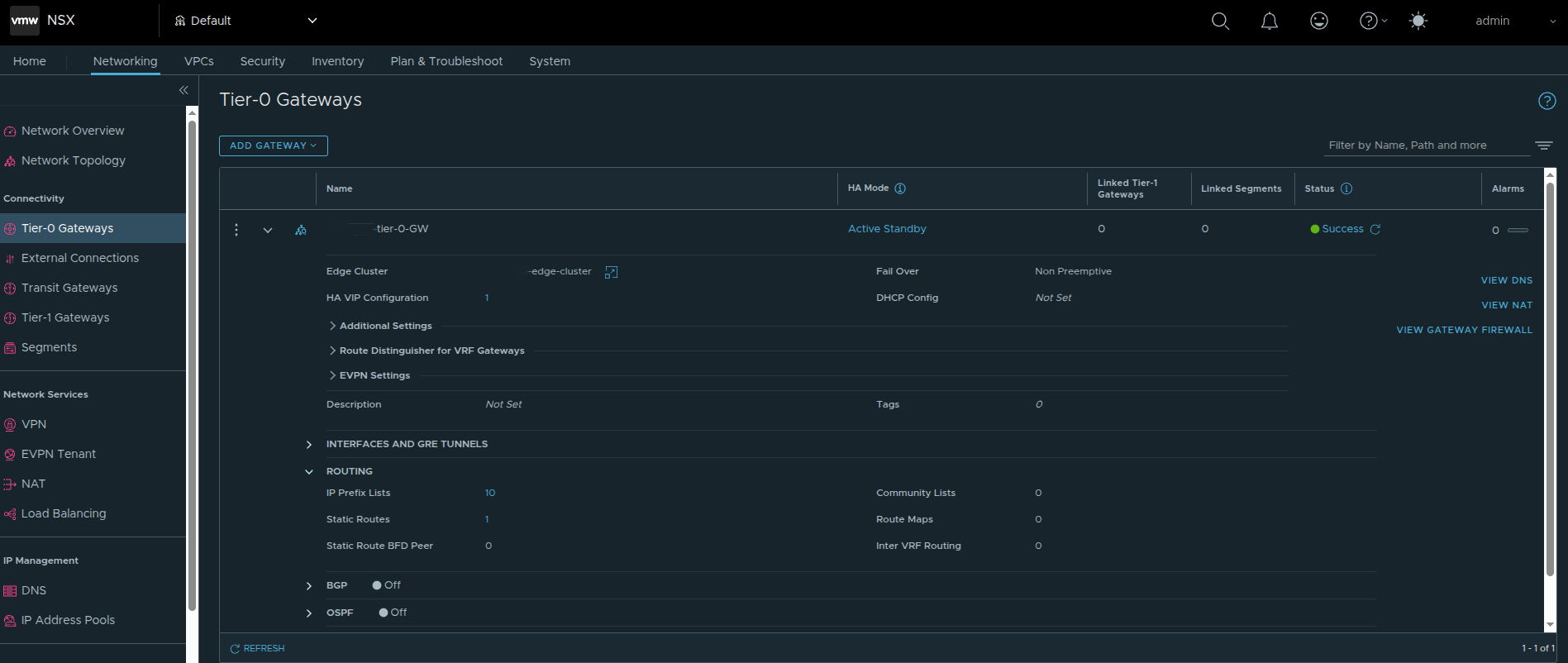
In the deployment shown here, the Tier-0 gateway is configured with Active Standby HA mode.
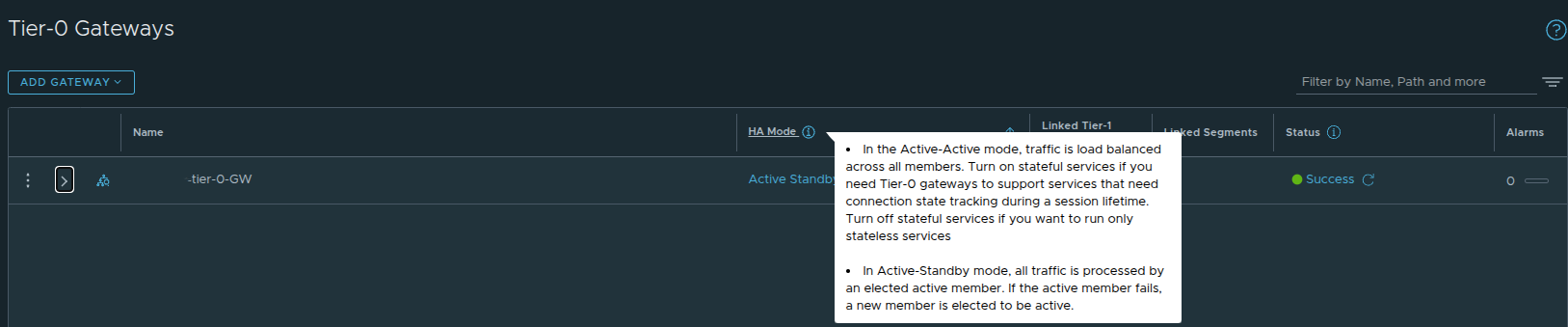
That is not a random preference. It is a design choice with real downstream impact.
Why Active/Standby Matters for VKS #
If the environment is intended to support Kubernetes workloads through VKS, I strongly recommend using Active Standby instead of Active Active for the Tier-0 path supporting those workloads.
The reason is predictability.
Active/Standby provides:
- deterministic traffic flow
- simpler failover behavior
- a cleaner model for ingress and north-south services
- a better fit for stateful and service-driven traffic patterns
Active/Active can work, but it introduces additional complexity that is unnecessary for many VKS-oriented designs.
If the Tier-0 will be used for VKS and Kubernetes-backed services, Active/Standby is the safer and more intentional choice.
Routing: Static Routes Can Work, But BGP Is Still the Better Long Term Answer #
In the example environment shown here, a static route was configured at the Tier-0.
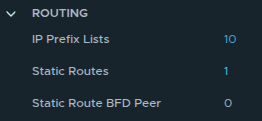
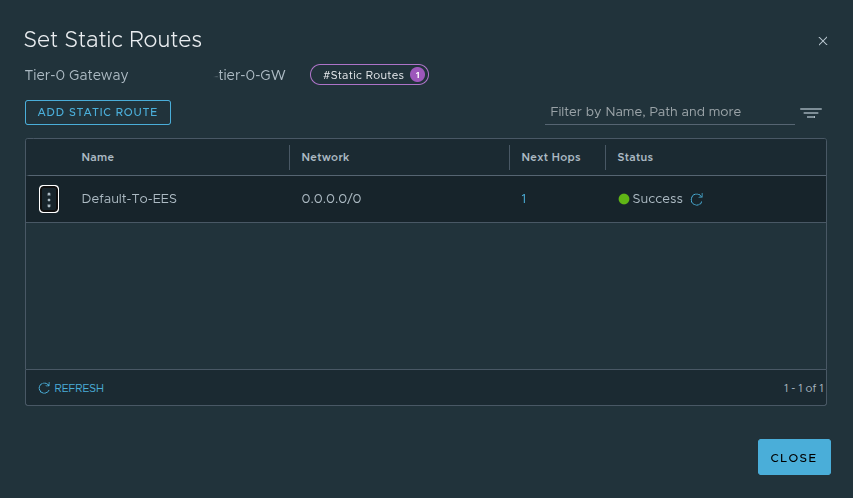
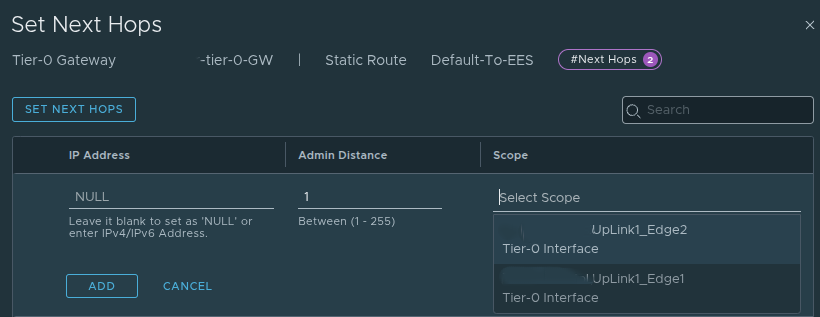
This design uses a default route and next hop aligned to the Tier-0 uplinks, which is valid and can be perfectly acceptable in a tightly controlled environment.
Static routing has a few benefits:
- simplicity
- explicit route behavior
- straightforward troubleshooting in smaller designs
However, if the environment is intended to grow, or if operational efficiency and resiliency matter, BGP is still my recommendation.
Why I Prefer BGP #
BGP provides:
- dynamic route advertisement
- cleaner failover behavior
- less manual overhead as the environment changes
- better alignment with scalable north-south routing
Static routes can absolutely get the job done. But once namespaces, ingress, egress, and application exposure become more dynamic, BGP is usually the better operational choice.
That is one reason Sargon’s BGP-focused reference is such a good complement to this discussion.
VPC Changes the Design Conversation #
If the environment is using VCF Networking with VPC, the design discussion expands beyond just Edge nodes and a Tier-0.
That is because VPC introduces additional objects and relationships that must already make sense before the Supervisor can consume them properly.
At a high level, that means understanding:
- external connectivity
- transit gateway design
- external IP blocks
- private IP blocks
- private transit gateway ranges
- VPC connectivity profile behavior
One of the important concepts in the VCF 9 and NSX VPC model is that the connectivity profile defines how VPCs consume outside connectivity. It effectively ties together:
- the northbound path
- the IP blocks available for consumption
- the transit gateway relationship
- certain outbound behavior choices, including NAT-related handling where applicable
So when a team says that they are using VPC, that is not enough by itself.
The more important question is whether the VPC plumbing has actually been designed correctly for how namespaces, services, and ingress will behave later.
NAT Was a Real Architectural Tension #
One of the most important discussions in this deployment path was around NAT and routability.
In environments with stricter security or policy constraints, NAT may be something teams want to avoid or minimize. That often makes NSX Classic more attractive because it aligns more naturally with directly routed designs.
The challenge is that the VPC model introduces constructs such as:
- public and external IP handling
- private and transit subnet behavior
- translation-based exposure patterns in some workflows
That creates a practical architectural tension:
- if you want the modern VPC model and the path toward All Apps, VPC matters
- if the environment strongly resists NAT or translation, the design needs to be approached carefully
This is exactly why the networking choice is more than a technical checkbox.
It shapes the tradeoffs the platform will live with later.
Default CNI Behavior Matters Too #
Even after the networking model is chosen at the infrastructure layer, networking decisions continue inside the Kubernetes layer.
By default, VKS uses Antrea as the Container Network Interface, or CNI.
That matters because Antrea provides:
- pod-to-pod networking
- Kubernetes-native network policy enforcement
- observability and control at the Kubernetes layer
This becomes relevant when troubleshooting cluster networking or planning policy behavior, because not everything is handled purely by the NSX infrastructure layer. There is also a Kubernetes-native networking layer operating inside the cluster.
The Supervisor Deployment Workflow #
Once the architectural groundwork is in place, the deployment workflow itself becomes much easier to reason about.
Step 1: Navigate to Supervisor Management #
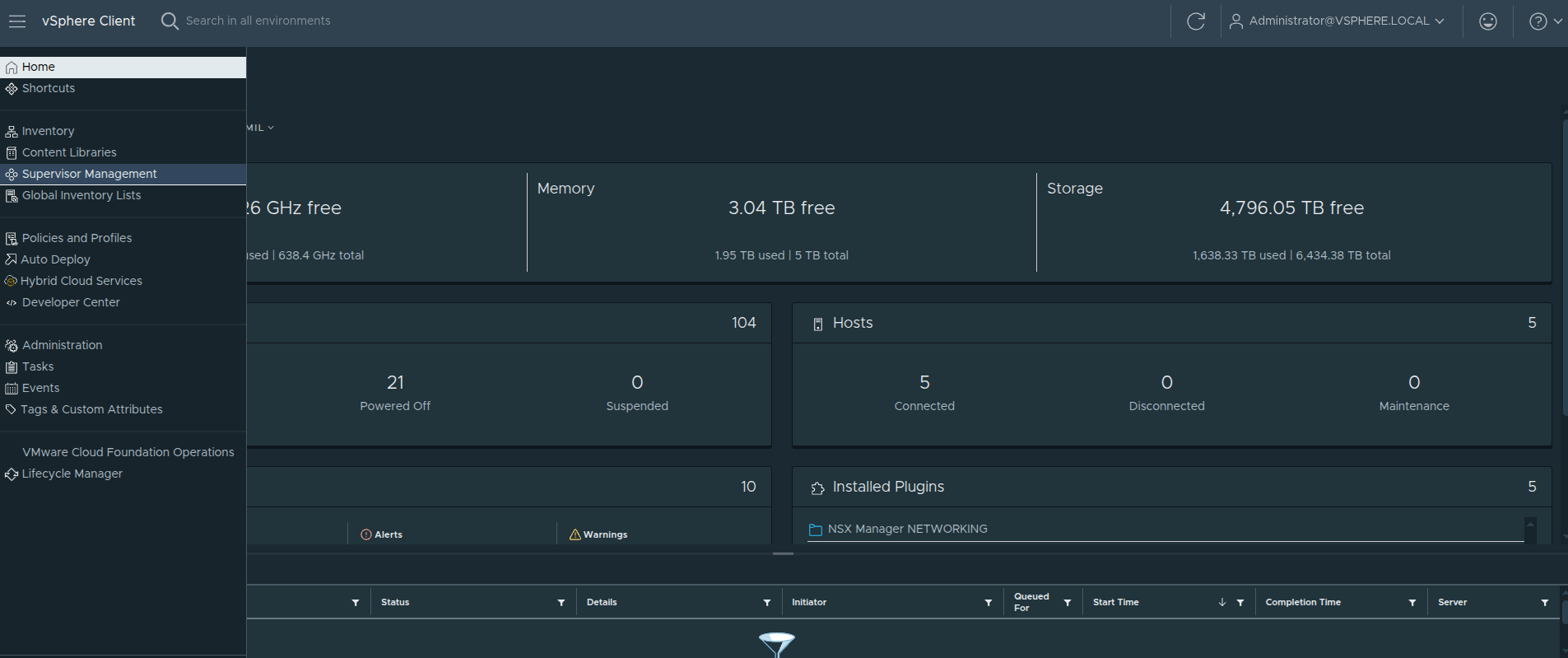
The first step is not actually inside the deployment wizard yet.
From the vSphere Client, open the navigation menu in the top left, then select:
Supervisor Management
This brings you to the area where Supervisor clusters are deployed and managed.
This step may seem simple, but it is worth calling out because it is the entry point into the entire platform workflow.
Why This Step Still Matters #
Even though this is just navigation, it represents a transition point.
By the time you reach this screen, all of the earlier design decisions should already be made:
- networking model, whether VPC, NSX Classic, or VDS
- Tier-0 design and routing approach
- load balancing strategy
- IP planning for management and workload networks
- storage and availability expectations
So the real question at this point is not:
Which option do I feel like choosing?
It is:
Which option aligns with the platform I have already designed?
Supervisor Location: Zones Versus Cluster Deployment #
The next major decision is where the Supervisor will run.
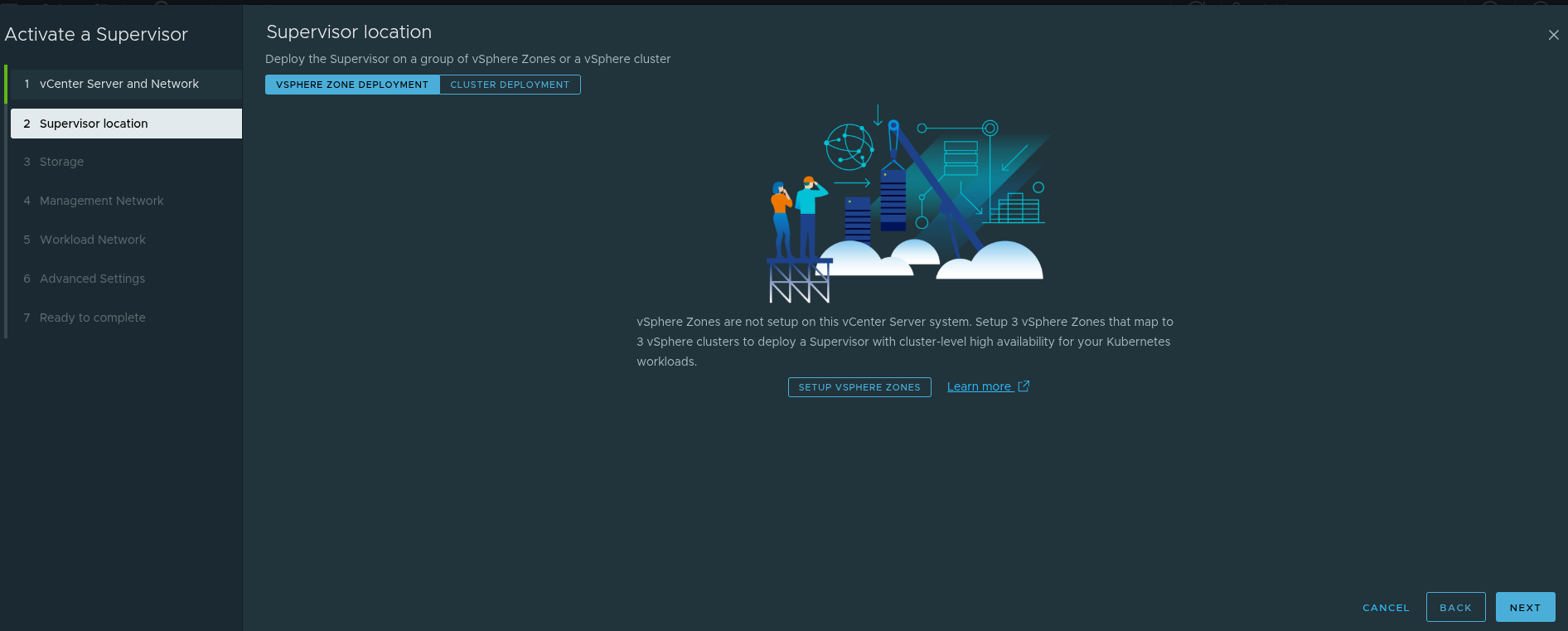
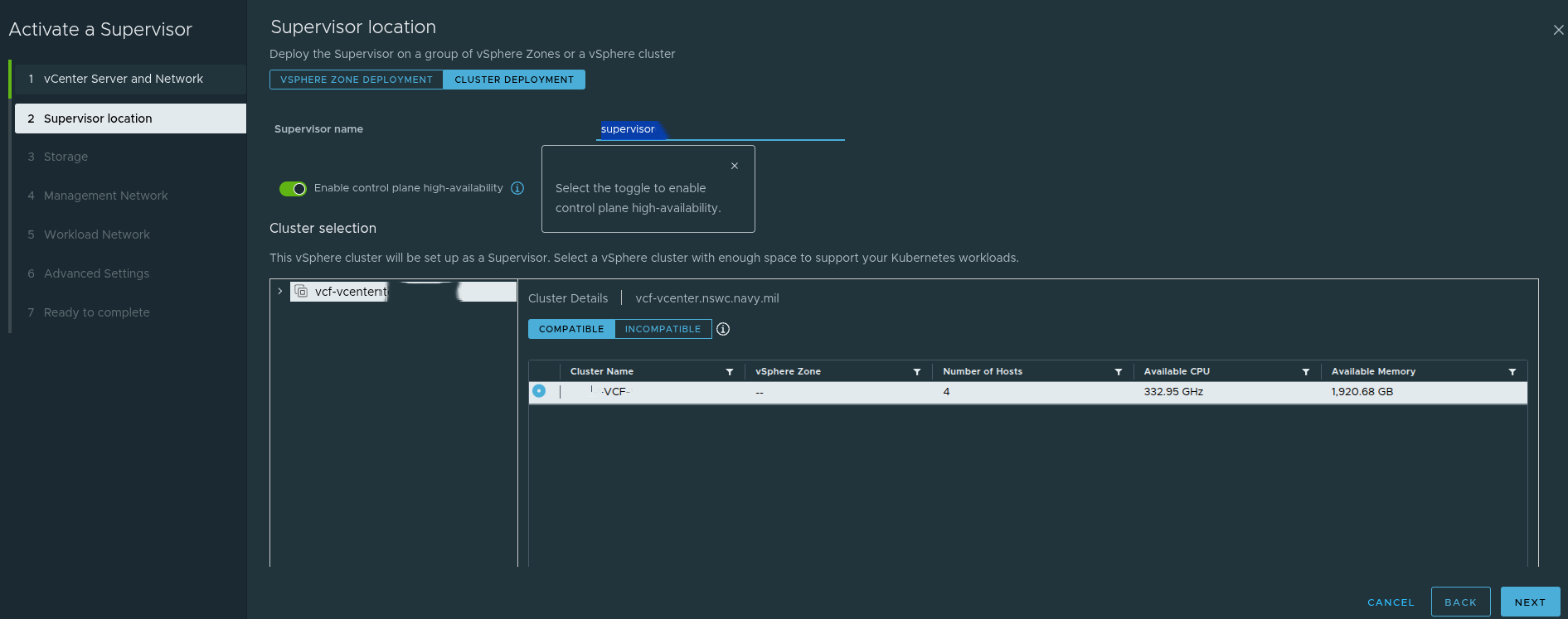
The Supervisor can be deployed using:
- a vSphere Zones model
- a single-cluster model
This matters because it affects availability design.
A zonal design supports a higher availability posture at the cluster level.
A single-cluster design is simpler, but availability behavior depends more directly on the cluster and host-level configuration.
The screenshot also highlights the control plane high-availability toggle. That setting affects how the control plane is deployed and has downstream effects on IP planning and operational expectations.
Storage Policy Still Matters #
Storage policy selection is not usually the most controversial part of the deployment, but it still matters.
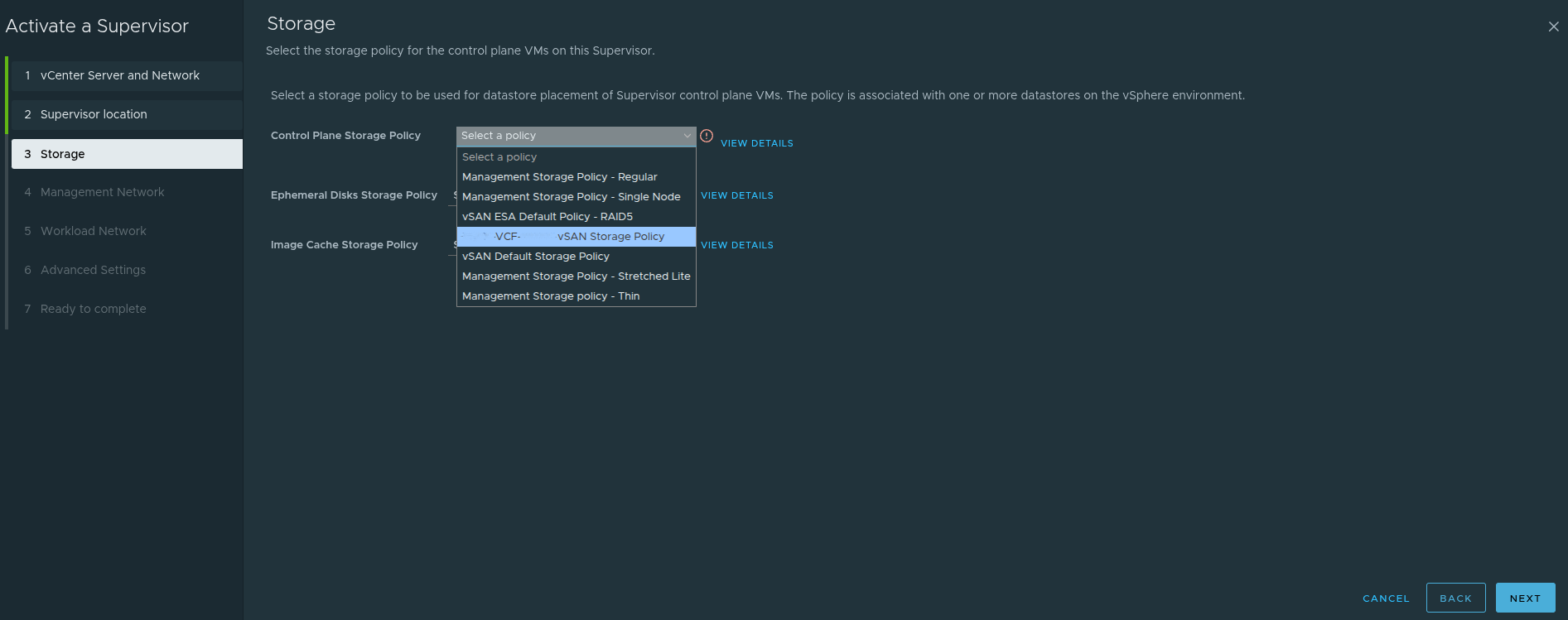
This step determines storage policy choices for:
- control plane VMs
- ephemeral disks
- image cache
These settings should align with the storage design of the environment rather than being treated as defaults to accept blindly.
Ephemeral Versus Persistent Storage #
It is also worth reinforcing the difference between ephemeral and persistent storage in Kubernetes-based platforms.
- Ephemeral storage exists only for the lifetime of the pod or workload and is typically used for transient data such as logs, scratch space, or temporary runtime artifacts.
- Persistent storage is backed by vSphere storage policies and is intended for stateful applications that must retain data across restarts and rescheduling events.
That distinction matters when planning storage classes and application behavior later.
The Management Network Is a Real Design Input, Not Just a Form Field #
The management network step is one of the most practical and important parts of the deployment.
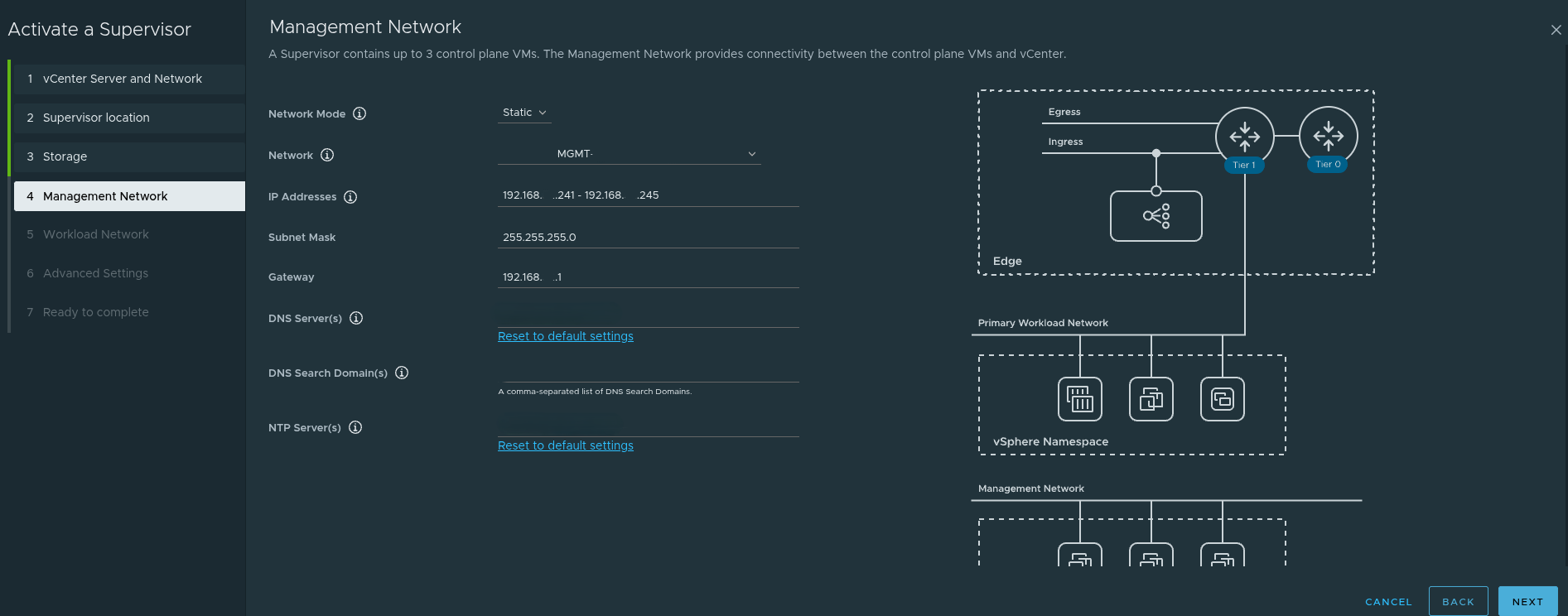
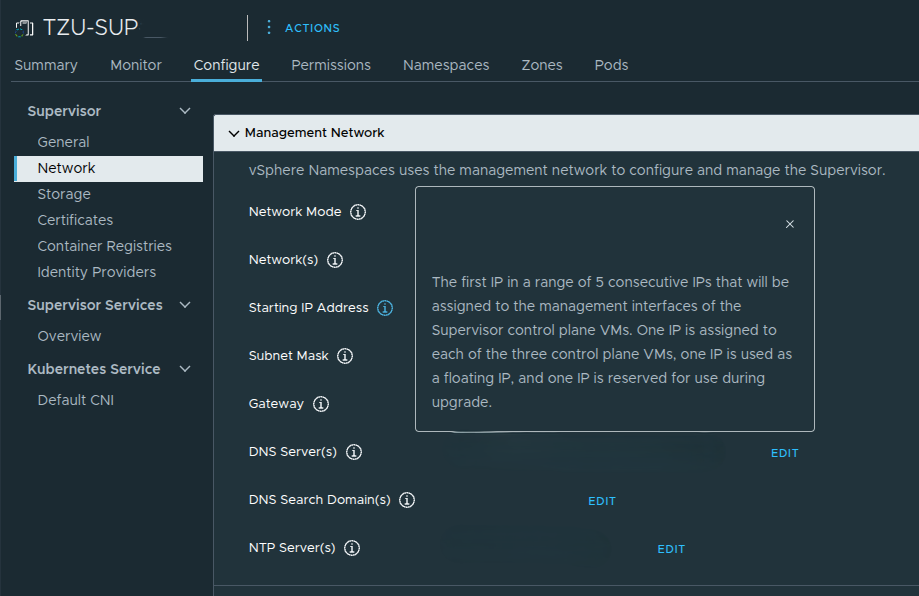
A very important detail here is that the Supervisor requires five consecutive IP addresses on the management network.
Those five addresses are used for:
- the three control plane VMs
- one floating IP
- one reserved IP for upgrade behavior
That is why, in the example discussed, a range such as:
192.168.x.241 - 192.168.x.245
was used intentionally rather than just pulling a random address.
This also explains why navigating to one of those IPs later resulted in the expected Supervisor endpoint behavior.
In addition to the IP range itself, the management network step also depends on correct values for:
- subnet mask
- default gateway
- DNS servers
- DNS search domain
- NTP
If those are wrong, the platform may deploy but access and lifecycle behavior quickly become problematic.
The Workload Network Is Where Reachability Becomes Real #
The workload network page is where the design begins to directly influence how workloads and services will actually be consumed.
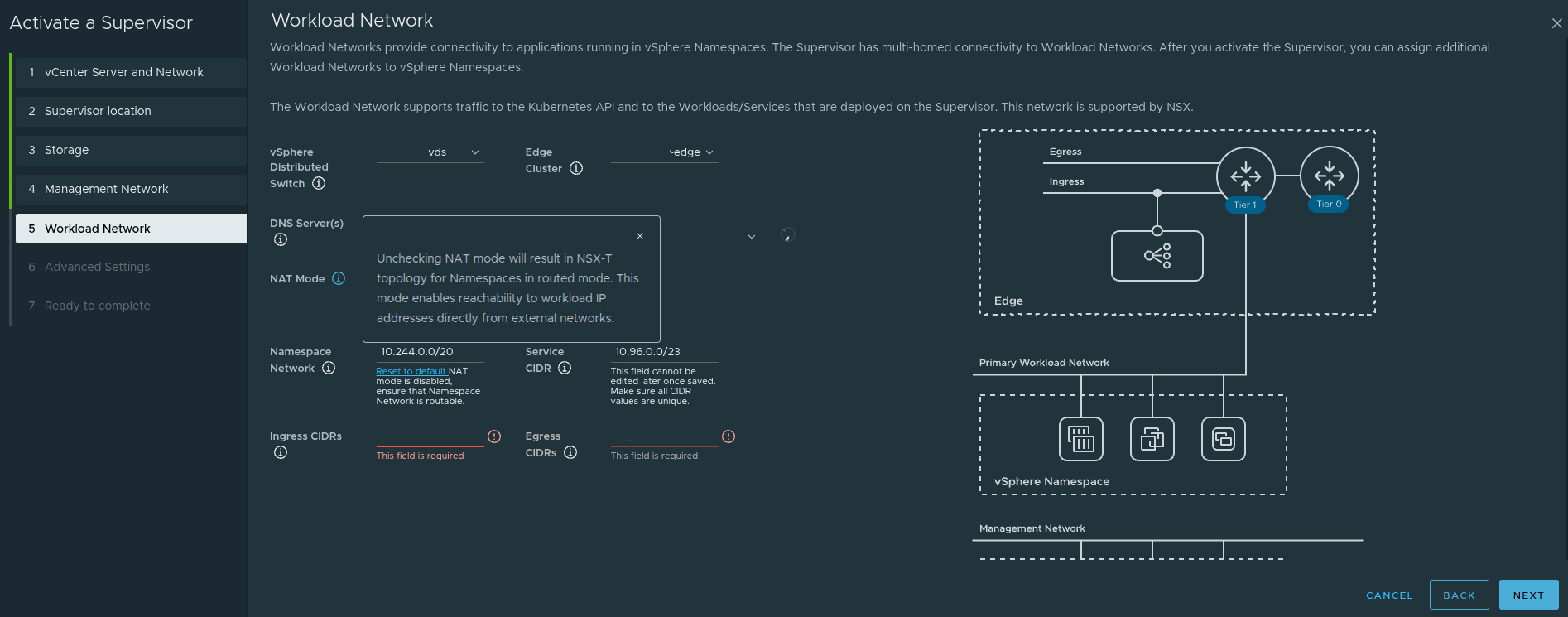
This is where the deployment defines things such as:
- namespace network CIDRs
- service CIDRs
- ingress CIDRs
- egress CIDRs
- NAT behavior
One particularly important point from this workflow is the NAT mode behavior.
If NAT is disabled, the topology becomes more directly routed, and workload IPs can be reachable from external networks if upstream routing is aware of them.
That sounds attractive, but it also means:
- upstream routing must be designed properly
- network teams must understand the namespace and workload CIDRs
- ingress and egress expectations must be explicit
This is why workload networking cannot be treated as a page you simply fill in during the wizard. It depends on the surrounding architecture already being correct.
Advanced Settings Are Small in the UI but Significant in Impact #
The advanced settings page is easy to treat as a final checkbox step, but it still carries design implications.
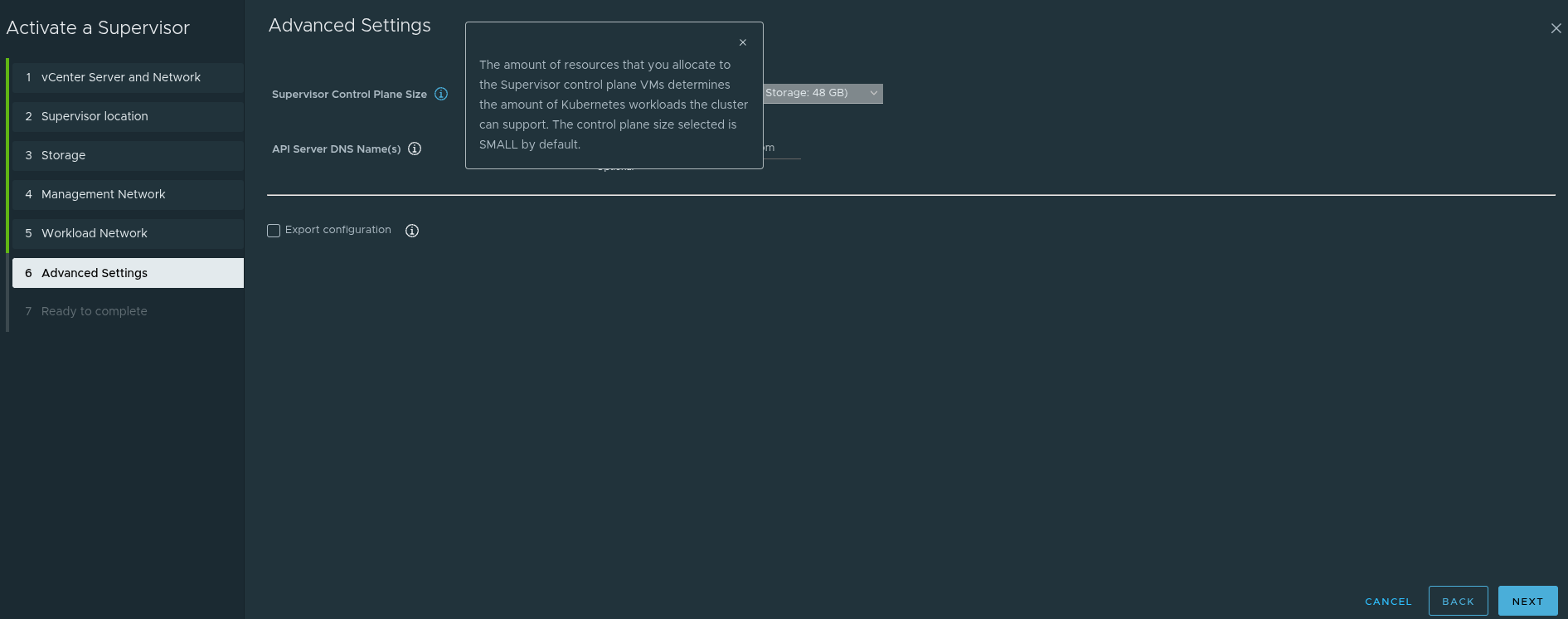
This step includes things such as:
- control plane sizing
- API server DNS name behavior
- configuration export options
The control plane size matters because it influences how much Kubernetes capacity the Supervisor can support.
Again, this reinforces the broader point: enabling a Supervisor is a platform sizing decision, not just a feature enablement action.
Final Review: This Is Where the Design Shows Up #
The final review page is where all of the earlier decisions become visible together.
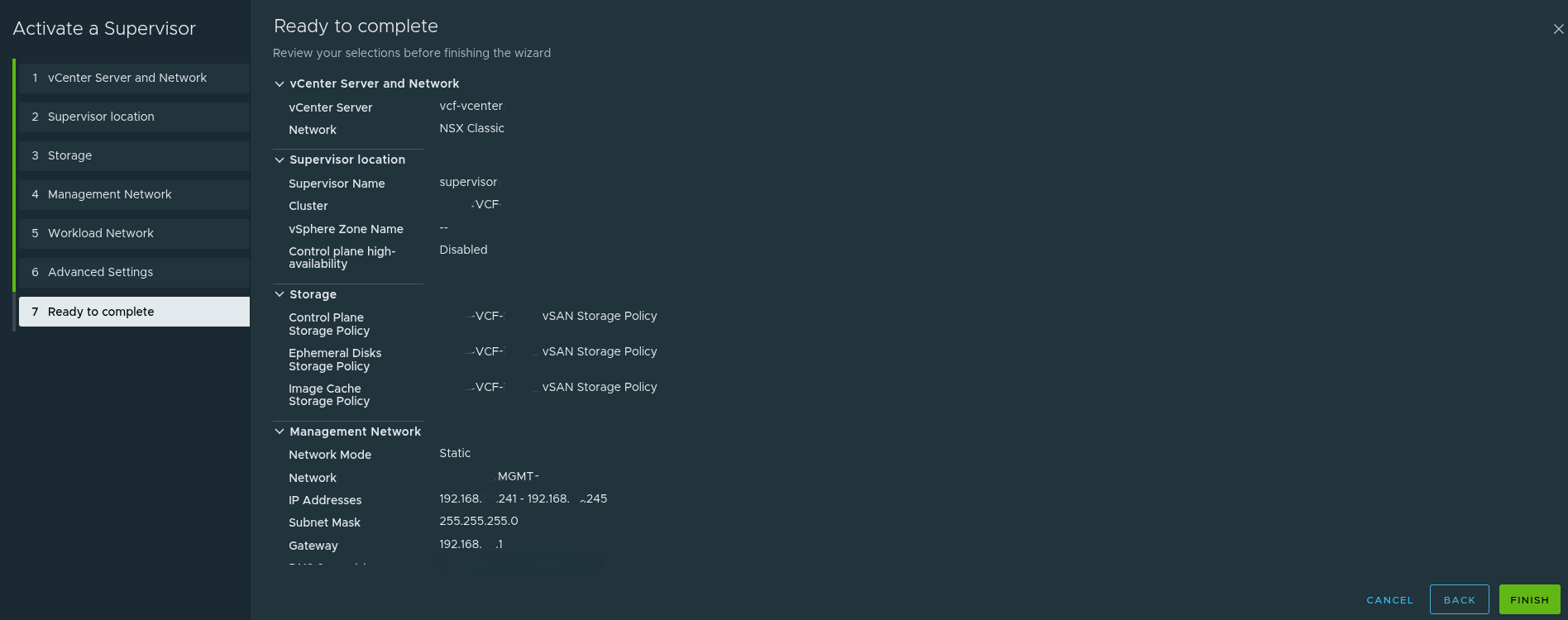
At this stage, the deployment either reflects a well-thought-out architecture or it reveals that the wizard was filled out without enough design work behind it.
This is where good planning becomes obvious.
After Deployment: The Supervisor Is Running, But the Platform Journey Is Just Beginning #
Once deployment is complete, the Supervisor becomes visible in the vSphere Client inventory and can be validated from the Supervisor Management view.
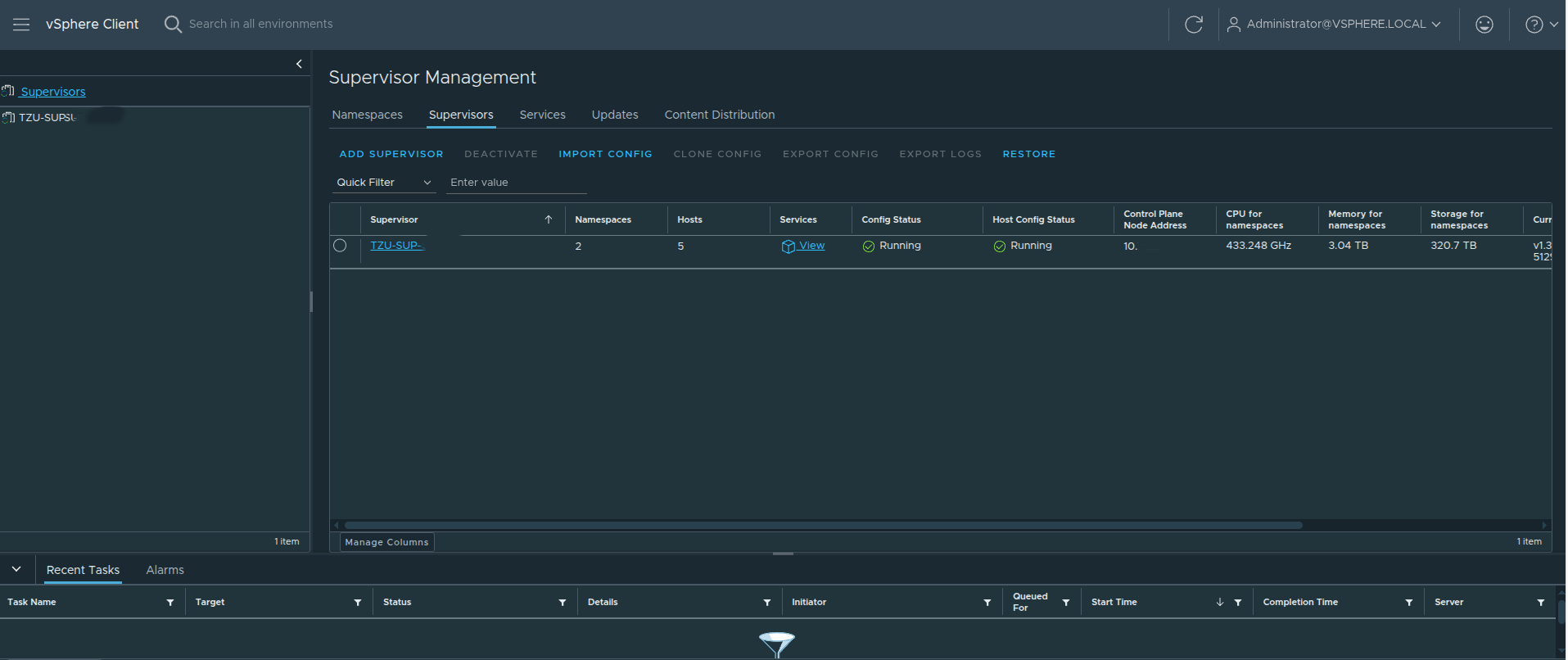
A running Supervisor is important, but it is not the finish line.
This is where many teams stop too early.
A running Supervisor does not automatically equal a developer-ready platform. It simply means the control plane foundation now exists.
What matters next is how that foundation is consumed.
Supervisor Lifecycle Versus Workload Cluster Lifecycle #
One of the most important operational points to understand is that the Supervisor and the workload clusters do not share the exact same lifecycle.
Updating the Supervisor does not automatically update the VKS clusters running on top of it.
That means:
- the Supervisor can be upgraded successfully
- but a workload cluster can still be outdated
- application issues can still appear if the workload cluster version does not match the application requirements
This separation is intentional.
The Supervisor is the platform control plane.
The VKS clusters are workload consumers with their own lifecycle path.
Operationally, that means you should always validate workload cluster compatibility and lifecycle state after Supervisor upgrades rather than assuming everything above it moved automatically.
Accessing the Supervisor Endpoint and Understanding the VCF CLI Page #
Once the Supervisor is reachable, navigating to the endpoint presents the VCF Consumption CLI page.
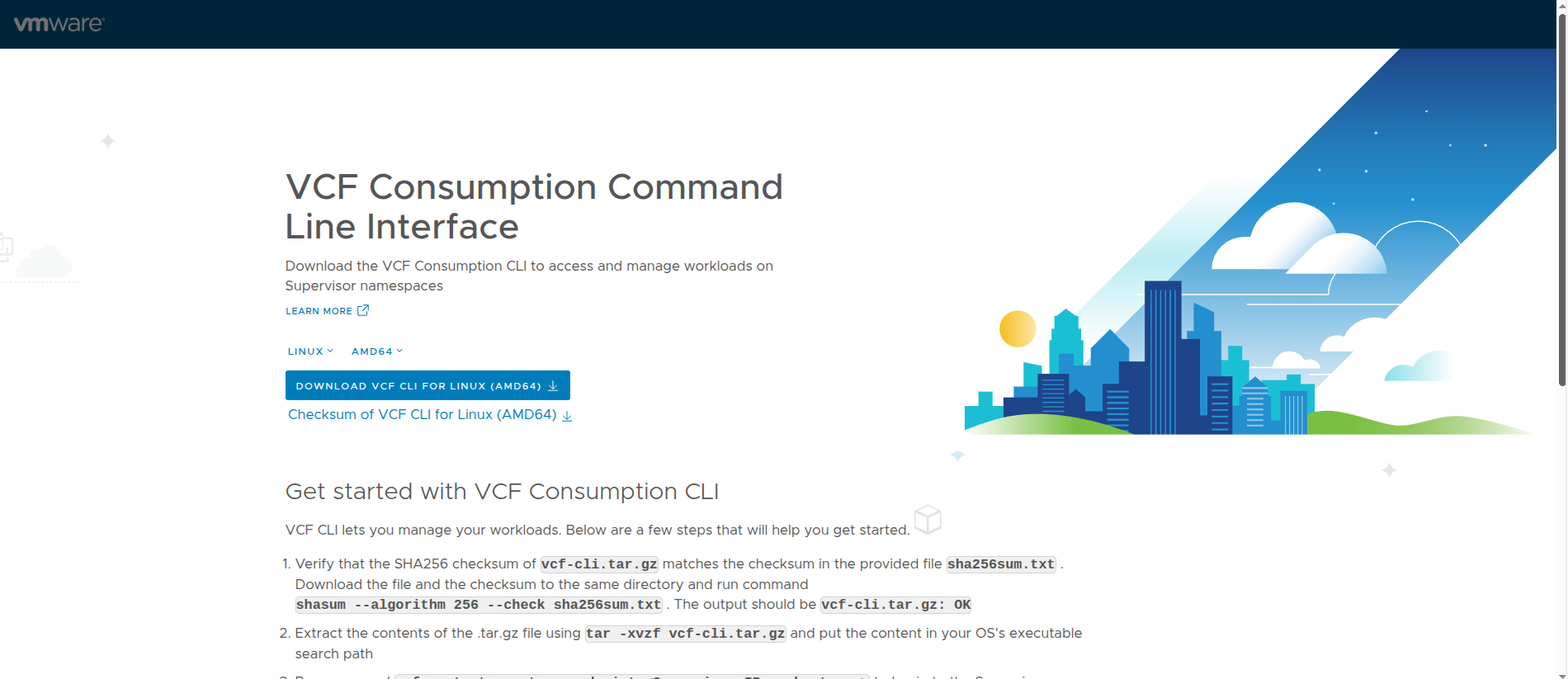
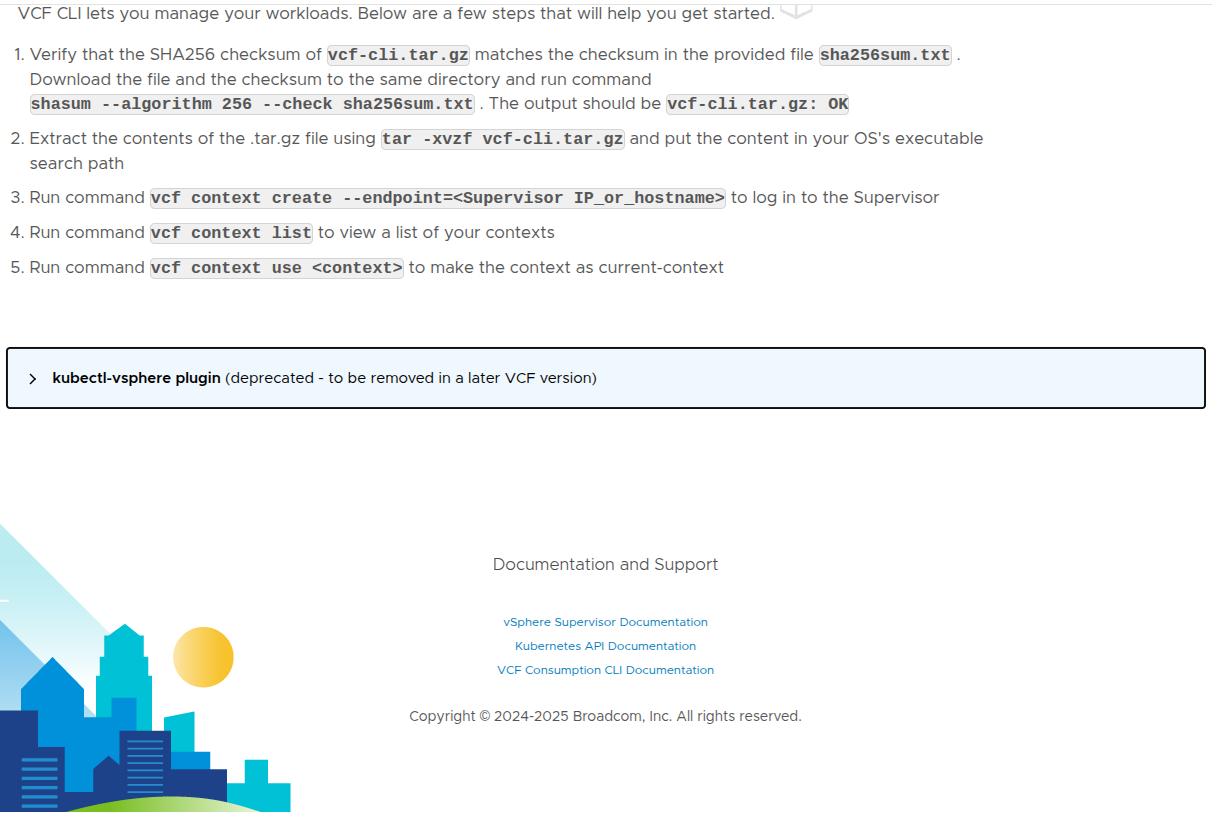
This page is significant for a few reasons.
First, it validates that the Supervisor endpoint is actually reachable.
It is also important to understand that the IP used to access this page is not just any of the control plane node addresses. The Supervisor is deployed with a range of five IPs, where one of those IPs is assigned as a floating IP (VIP) that represents the control plane.
This floating IP serves as the primary access point for:
- the Kubernetes API
- the VCF CLI
- browser-based access to the Supervisor endpoint
Because this IP is virtual and not tied to a single control plane node, it can move between nodes to maintain availability. This ensures a consistent and highly available endpoint for interacting with the platform.
Second, it makes it clear that the Supervisor is intended for real administrative and consumption workflows rather than being a hidden backend service.
The page provides:
- the VCF CLI download
- checksum validation guidance
- extraction steps
- context creation commands
- context listing and usage commands
That is important because it shows how VMware is positioning the VCF CLI as the primary modern interface for interacting with workloads on the Supervisor.
The basic flow shown here includes:
- download the CLI package
- validate the SHA256 checksum
- extract the package
- create a context against the Supervisor endpoint
- list available contexts
- set the current context
This is a strong operational confirmation that the platform is not only running, but also exposing its intended access workflow.
Kubernetes Context Awareness Is Critical #
One of the most common operational mistakes in VKS environments is using the wrong Kubernetes context.
In a VCF environment, you are often dealing with multiple layers of access, such as:
- the Supervisor context
- namespace-related context
- workload cluster context
If the wrong context is used, commands can fail in confusing ways, especially after upgrades or context regeneration.
That means it is important to:
- list contexts intentionally
- switch contexts explicitly
- confirm the target before running cluster-level commands
This is especially important after:
- Supervisor upgrades
- workload cluster creation
- kubeconfig updates
- switching between multiple clusters or environments
Understanding context separation makes troubleshooting much more efficient and avoids a lot of unnecessary confusion.
How VKS Actually Works Under the Hood #
VKS is not just Kubernetes running on a few VMs. It is built on multiple layers of control.
Those layers include:
- Virtual Machine Service, which manages the lifecycle of the VM-based cluster nodes
- Cluster API, which provides declarative Kubernetes lifecycle management
- Cloud Provider integration, which connects Kubernetes behavior to vSphere infrastructure services
This layered architecture enables:
- declarative cluster creation using YAML
- automated reconciliation
- lifecycle management through supported APIs instead of manual VM handling
- integration with vSphere networking and storage constructs
That is one reason VKS should be thought of as a platform service, not just a collection of virtual machines.
What Comes Next: Namespaces #
At this point, the Supervisor is running and reachable, but it still is not a complete platform from a developer or tenant perspective.
The next major step is to create vSphere Namespaces.
That is where the platform starts becoming consumable.
Namespaces are where you begin defining:
- who can use the platform
- how much compute and memory they receive
- what storage is available
- what networking they can consume
- what services are exposed to them
This is the point where the Supervisor begins transitioning from an infrastructure capability into an actual platform.
Continuing Beyond Namespaces: Supervisor Services #
After namespaces are in place, the next stage is extending the platform with Supervisor Services.
A very useful reference for continuing this configuration is the Supervisor Services catalog:
That catalog is valuable because it shows what can come next once the Supervisor and namespaces are already working, including examples such as:
- vSphere Kubernetes Service
- Local Consumption Interface
- Harbor
- Contour
- ExternalDNS
- Supervisor Management Proxy
- ArgoCD
- other platform services
This is an important reminder that deploying the Supervisor is not the end of the story.
It is the starting point for building the platform that sits on top of it.
Harbor as a Good Example of Platform Maturity #
When Harbor is added as a Supervisor Service, it introduces useful security and operational capabilities such as:
- image vulnerability scanning
- image signing and trust-oriented workflows
That helps reinforce the broader theme of this article: once the Supervisor is working, the next stage is not just enabling more features. It is maturing the platform so that workloads can be delivered and operated more safely.
Final Thoughts #
Deploying a Supervisor in VCF 9 is not difficult from a wizard perspective.
What actually matters is everything around it.
That includes:
- understanding that the Supervisor is a platform dependency stack, not just a feature toggle
- choosing the right networking model deliberately
- recognizing that VPC is the path that supports All Apps in VCF Automation
- understanding that NSX Classic aligns more naturally to VM Apps
- remembering that VDS is the exception where NSX is not required
- designing the Tier-0 carefully if NSX is in scope
- using Active/Standby when the Tier-0 will support VKS workloads
- making a thoughtful choice between static routing and BGP, while recognizing BGP is often the better long term answer
- planning management and workload network inputs intentionally
- understanding the difference between Supervisor lifecycle and workload cluster lifecycle
- handling Kubernetes contexts carefully during real operations
- validating not just deployment success, but actual Supervisor endpoint usability
- continuing beyond the Supervisor into namespaces and services
If the design is right, the deployment feels easy.
If the design is wrong, the deployment may still finish, but the platform will not deliver what the team expected.
That is what actually matters.